
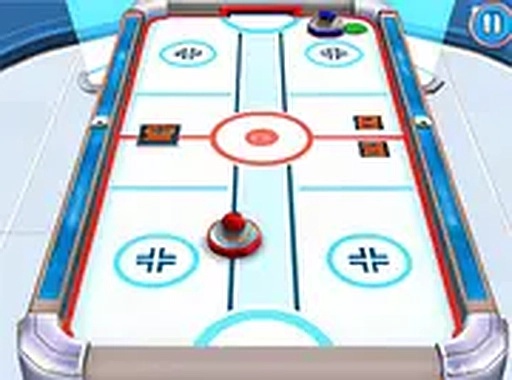
What You Do Each Match
Every match in Tabletop Puck Battle 3D follows the table hockey format: two sides face off across a flat surface, and each player slides a paddle in any direction. Your job is to knock a small disc past the opposing paddle and into the goal, while keeping it out of your own. The disc travels quickly, so matches demand steady attention and fast hand movement. Rounds are intentionally short, which suits both quick breaks and longer sessions. Because the game runs in a browser, no installation or setup is required.
How the 3D View Helps
The playing field is rendered from a modern 3D perspective, giving the table, paddles, and disc a sense of depth. Clean lines and subtle lighting make the surface easy to read. The camera shows the entire table at once, so you can follow the disc's path without anything blocking your view. Background detail stays minimal, which keeps attention on the puck. That clarity matters most during fast exchanges, when a split-second read of the disc's trajectory decides the point.
Single-Player and Local Multiplayer
Tabletop Puck Battle 3D offers two ways to play. In single-player, you face an AI opponent whose challenge level you select before each match, making it a practical place to rehearse aim and defensive positioning. In local multiplayer, two players share one screen and each controls a paddle from opposite ends. You can also set a target score before a match, which controls how many goals are needed to win and lets you decide how long a session runs.
Controls Across Devices
Input adapts to your hardware. On desktop, moving the mouse slides the paddle in direct relation to cursor movement. On touch devices, dragging a finger across the screen produces the same result. Both methods feel immediate, supporting broad sweeps to block shots and small adjustments to redirect the disc. Responsiveness matters here because reaction time often decides a point. The interface stays simple: one button starts a match, and full-screen mode can be toggled on or off.
Reading the Disc and Placing Your Paddle
Two skills decide most matches: anticipation and paddle placement. Since the disc moves briskly, you need to read its path early and move into position before it arrives. Chasing the disc after it has passed rarely works. Experienced players keep the paddle near the center and make small corrections instead of large sweeps. In multiplayer, changing the angle and speed of your shots can catch an opponent off guard. Playing the AI at higher difficulty settings is a reasonable way to sharpen reflexes before facing a human opponent.
COMMENTS
0 comments